|
|
|
|
| |
| |
As a valued System Architect®
customer, we want to let you know that a new
version of System Architect has been
commercially released. We continue to drive
improvements to the product within themed areas
to enable you to build and maintain a strategic,
value-driven enterprise architecture.
System Architect 2026 – Update 2 – Version 11.4.13.2
provides the following
enhancements:
|
|
|
| |
|
Frameworks – Support for UAF 1.3:
System Architect now supports UAF 1.3, which is the latest version of the Unified Architecture Framework specification, finalized by the Object Management Group in March 2026. |
|
|
| |
|
|
|
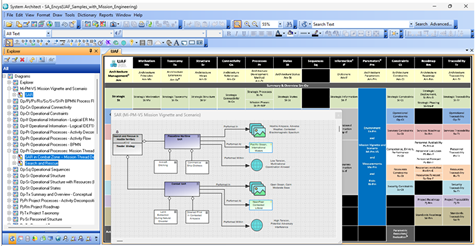
The main enhancement to the UAF 1.3 specification is support for Mission Engineering (ME) |
|
|
|
|
The main enhancement to the UAF 1.3 specification is support for Mission Engineering (ME).
ME is the model-based process of analyzing, designing, and optimizing "systems of systems"
to achieve specific warfighting effects, rather than individual platforms.
UAF 1.3 provides the architectural framework (views, models, and taxonomy) to connect operational,
strategic, and resource perspectives to validate mission capabilities before development.
Besides the UAF 1.3 full metamodel, System Architect now supports modeling of the following
new UAF View Specifications:
|
|
|
|
|
• |
Mi-Pm-VS Parameters: Mission Vignette and Scenario |
|
|
|
• |
St-Pr-MP Strategic Processes: Mission Phases |
|
|
|
• |
Op-Pr-MT Operational Processes: Mission Threads |
|
|
|
• |
Rs-Pr-MET Resources Processes: Mission Engineering Threads |
|
|
|
|
Usability – Updated User Interface:
System Architect will look a lot more modern when you open it up. The control package for System Architect's toolbar has been upgraded. As a result, System Architect is now presented with toolbars with a blue background. If you wish to turn this look off, add the following to sa2001.ini or .mst:
|
|
|
|
|
|
[User Interface]
UseLuna=F |
|
|
| |
|
Usability – Larger Menu Draw Icons:
Menu and toolbar icons have been scaled up to make larger button sizes neater. If you wish to turn this new scaling off, use the Icon* setting in the ini editor.
|
|
|
| |
|
Usability – Line Auto-Routing, Assign Connections:
The Diagram Auto Routing, Assign Connections functionality has been improved so that you can now turn on/off its setting for existing diagrams in the Tools, Preferences dialog. The setting chosen will override the setting last set on the diagram. This helps users who reopen a diagram wherein "Assign Connections" or "Retain Connections" was left on - and lines are adjusted according to the setting, against their wishes. |
|
|
|
|
Usability – Properties Pane:
You can now view and edit the properties of newly added symbols in the Properties pane, whereas previously you needed to save the diagram or use Advanced Edit. |
|
|
|
|
Usability – Name Position in Handlebars Retained:
An improvement now makes it such that the positioning of symbol names, repositioned using handlebars, is maintained after moving adjoining node symbols or using symbol alignment commands. |
|
|
|
|
Usability – Draw Live Picture of Diagram:
When using the Draw, Picture, Diagram function to add multiple live diagram layers onto a diagram - the Picture of Diagram dialog now offers only diagram types for which instances exist. |
|
|
|
|
Usability – Select All Symbols of a Type:
New functionality enables you to right-mouse click on any node or line symbol, and Select All Symbols of (that) Type on the diagram. This functionality is also available in the Edit menu. |
|
|
|
|
SA XT Diagramming – Icons on the Draw menus and Top menus have been scaled up to make larger button sizes neater. New css custom properties are available to allow you to control the size of these icons:
|
|
|
|
|
• |
The Top Toolbar is controlled by: toptoolsizespecify. Note that most Top Toolbar icons have been scaled up, but the default size remains as it was. |
|
|
|
• |
The Draw Toolbar is controlled by: drawtoolsize. |
|
|
|
• |
The Menus are controlled by: drawtoolsizeinmenu. |
|
|
| |
|
SA REST Reporting Endpoint
– A new endpoint has been added to the SA REST webservice to process SA reports. Using the following URL template, a user can run a report using SA Report Generator syntax stored in a report file, and output results using a custom stylesheet, or one of the provided stylesheets to output HTML table, XML, or JSON results.
http://<Machine Name|IP>:<Port>/SARest/SQL/<Server Name>/<Encyclopedia Name>/<Workspace ID>/<Report File>/<Report Name>/<Stylesheet File>.
|
|
|
| |
|
Client Issues – A number of client
issues are also fixed, as enumerated and described in the Release
Notes. |
|
|
| |
|
|
| |
|
|
| |
At UNICOM®, our commitment is to ensure that
ongoing research and development continue for
all UNICOM Software Solutions and to maintain
the highest standards of technical support for
you, our customers.
|
|
|
| |
|
|
| |