|
|
|
|
| |
| |
As a valued System Architect®
customer, we want to let you know that a new
version of System Architect has been
commercially released. We continue to drive
improvements to the product within themed areas
to enable you to build and maintain a strategic,
value-driven enterprise architecture.
System Architect 2026 – Update 1 – Version 11.4.13.1
provides the following
enhancements:
|
|
|
| |
|
Frameworks
– SA now supports representationally consistent explicit and implicit relations based on read-only properties. This allows lines and hierarchical structures to be generated based on properties whose values are determined by other behavior. Users can employ these by using SABASIC scripts or VBA macros to update properties. This enhancement enables support of sysML2 advanced features. (sysML2 is still in beta.)
|
|
|
| |
|
Usability: Search
– The following enhancements are provided:
|
|
|
|
• |
General Search options now include the ability to match on Name, Description, and All properties. |
|
|
|
• |
You can now use Global Change/Free Form Text to change large blocks of text. Previously the dialog only provided one line to put text into. |
|
|
|
• |
The Find Symbols dialog is revised to simplify instructions and to offer information in columns, which supports filtering and sorting. |
|
|
|
|
Usability: Symbol Transformation
– When transforming an image copied into System Architect to a diagram symbol, you may now choose to store the image in the overriding Depiction property of the symbol's definition, versus its symbol Depiction property.
|
|
|
| |
|
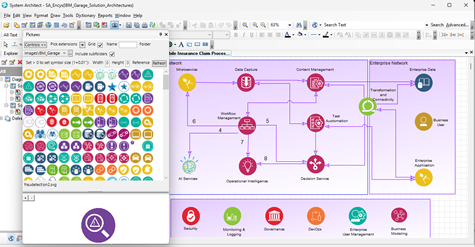
Usability: Picture Browser
– The following enhancements are provided:
|
|
|
|
• |
You may now view files from subfolders in the Picture Browser. |
|
|
|
• |
Filenames exclude the selected folder and separating backslash (\). |
|
|
|
• |
When importing a folder, you can choose to remove the source folder name. |
|
|
|
|
|
|
Continued enhancements to System Architect's new Picture Browser are featured in this release |
|
|
|
|
Usability: Doc Block Parent-Child Indicators
– You may now show or hide child indicators (shaded bars) around the Doc Block symbol in a child diagram.
|
|
|
| |
|
Usability: Properties Pane
– Several enhancements are provided for the Properties Pane window:
|
|
|
|
• |
The Details section of the Properties pane now scrolls and wraps text on individual characters. |
|
|
|
• |
You may now filter the Properties pane on whether a property has a value. |
|
|
|
|
SA XT Diagramming – A number of enhancements are provided:
|
|
|
|
• |
A new Find Symbol dialog is available, which has the same features as in rich client SA, described above. Right-mouse on a diagram workspace to access it from the pop-up menu.
|
|
|
|
• |
Child indicators are now presented in doc block symbols. These are optional as in rich-client System Architect. |
|
|
|
• |
You may now customize the text and server-formatted date and time in doc block symbols. Use the mst setting DocBlockProductText to specify text in place of the product name. |
|
|
| |
|
SA XT Custom Error Pages
– SA XT now intercepts browser error codes 403, 404, 500 and provides more descriptive and user-friendly error messages. It also logs the error details to an SAXTError log, in the location set by the value for "TempFolder" in the web.config file.
|
|
|
| |
|
Client Issues – A number of client
issues are also fixed, as enumerated and described in the Release
Notes. |
|
|
| |
|
|
| |
|
|
| |
At UNICOM, our commitment is to ensure that
ongoing research and development continue for
all UNICOM Software Solutions and to maintain
the highest standards of technical support for
you, our customers.
|
|
|
| |
|
|
| |